trust 認証のままというのもよくないだろうから、postgres ユーザのパスワードを変更して scram-sha-256 認証に戻すことにする。
まず、postgres ユーザのパスワードを 'grespost' に変更(SQL Shell (psql) で接続し作業)
postgres=# ALTER ROLE postgres WITH PASSWORD 'grespost';ALTER ROLE
次に、設定ファイルを編集。
(例)C:\Program Files\PostgreSQL\13\data\pg_hba.conf
# TYPE DATABASE USER ADDRESS METHOD# "local" is for Unix domain socket connections onlylocal all all scram-sha-256# IPv4 local connections:host all all 127.0.0.1/32 scram-sha-256# IPv6 local connections:host all all ::1/128 scram-sha-256# Allow replication connections from localhost, by a user with the# replication privilege.local replication all scram-sha-256host replication all 127.0.0.1/32 scram-sha-256host replication all ::1/128 scram-sha-256## TYPE DATABASE USER ADDRESS METHOD### "local" is for Unix domain socket connections only#local all all trust## IPv4 local connections:#host all all 127.0.0.1/32 trust## IPv6 local connections:#host all all ::1/128 trust## Allow replication connections from localhost, by a user with the## replication privilege.#local replication all trust#host replication all 127.0.0.1/32 trust#host replication all ::1/128 trust
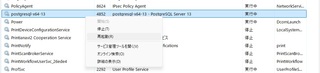
PostgreSQL を再起動する。(タスクマネージャーより)
これで、pgAdmin でパスワード無しで postgres ユーザで DB に接続しようとすると、「fe_sendauth: no
password supplied」と怒られるようになる。
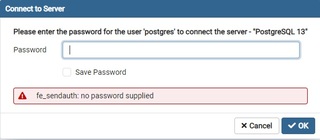
ここで変更後の 'grespost' パスワードを入力すれば接続できる。もう面倒くさいんで Save Password にもチェックしちゃう(笑)
無事接続完了。


コメントする