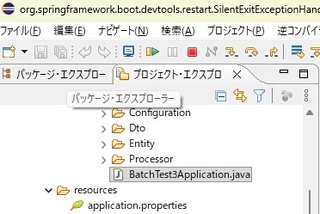
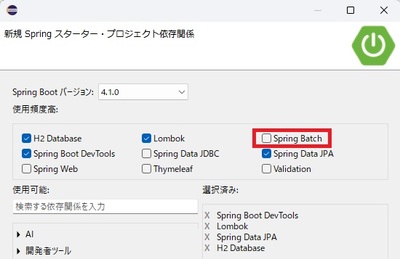
とは言っても、現時点で最新の Spring Batch 6 ですんなり動くサンプルコードがあまりネット上にもないので、初心者の人にはなんかの参考になるかも(初心者が Spring Batch でバッチなんか作らんやろうというご意見は聞き流します(笑))
■テストデータ(C:\Users\lovelyman\Documents\testdata_20260623_091037.txt)
000000100120260623091102001S00001
000000100120260623091102001E00001
000000110220260623091102001S00001
000000100320260623091102001S00001
000000100320260623091102001E00001
000000110220260623091102001E00001
000000100420260623091102001X00001
000000120520260623091102001S00001
000000120520260623091102001E00001
※トレイルランレースのデータをちょっと加工(笑)
1~10 ユーザID, 11~27 測定した時間(ミリ秒 3桁), 28~28 ステータス, 29~33 反応回数
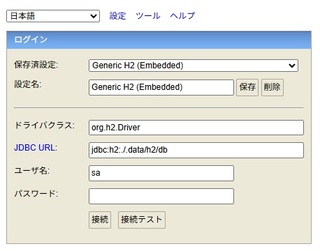
■resources/application.properties ※データベースは H2 を使用
spring.application.name=BatchTest3
# H2 を PostgreSQL 互換モードで使用(テーブル名等は小文字で)
spring.datasource.url=jdbc:h2:./.data/h2/db;MODE=PostgreSQL;DATABASE_TO_LOWER=TRUE
spring.datasource.driver-class-name=org.h2.Driver
spring.datasource.username=sa
spring.datasource.password=
# H2 Console を有効化
spring.h2.console.enabled=true
spring.h2.console.path=/h2-console
# JPA/Hibernate設定
spring.jpa.database-platform=org.hibernate.dialect.H2Dialect
spring.jpa.hibernate.ddl-auto=update
spring.jpa.show-sql=true
# バッチ完了後もサーバーを起動したまま(Webコンソール有効状態維持)
spring.batch.job.enabled=true
# Webアプリケーションとして常駐
spring.main.web-application-type=servlet
■Entity/TTimeRecordsEntity.java ※DB の table 構造
package com.netandfield.test.Entity;
import java.time.LocalDateTime;
import jakarta.persistence.Column;
import jakarta.persistence.Entity;
import jakarta.persistence.Id;
import jakarta.persistence.Table;
import lombok.Data;
import lombok.NoArgsConstructor;
@Data
@Entity
@Table(name = "t_time_records")
@NoArgsConstructor
public class TTimeRecordsEntity {
public TTimeRecordsEntity(Integer userId, LocalDateTime keepTime,
String stateCode, Integer readCount) {
this.userId = userId;
this.keepTime = keepTime;
this.stateCode = stateCode;
this.readCount = readCount;
}
// 主キーは userID
@Id
@Column(name = "user_id")
public Integer userId;
@Column(name = "keep_time")
public LocalDateTime keepTime;
@Column(name = "state_code")
public String stateCode;
@Column(name = "read_count")
public Integer readCount;
}
■Dto/TTimeRecordsDto.java ※読み込むデータ(テキスト)1行の構造
package com.netandfield.test.Dto;
import lombok.Data;
import lombok.NoArgsConstructor;
/**
* 固定長レコードからの読み込みデータクラス
*/
@Data
@NoArgsConstructor
public class TTimeRecordsDto {
private String userId; // Integer だがファイルからは文字列として読み込む
private String keepTime; // LocalDateTime だがファイルからは文字列として読み込む
private String stateCode;
private String readCount; // Integer だがファイルからは文字列として読み込む
}
■Processor/TTimeRecordsItemProcessor.java ※読み込んだデータの編集処理(特に日時)
package com.netandfield.test.Processor;
import java.time.LocalDateTime;
import java.time.format.DateTimeFormatter;
import org.springframework.batch.infrastructure.item.ItemProcessor;
import org.springframework.stereotype.Component;
import com.netandfield.test.Dto.TTimeRecordsDto;
import com.netandfield.test.Entity.TTimeRecordsEntity;
@Component
public class TTimeRecordsItemProcessor implements
ItemProcessor<TTimeRecordsDto, TTimeRecordsEntity> {
// テキストデータの日付のフォーマット(例:20260623091102001)※ミリ秒以下 3桁
private static final DateTimeFormatter FORMATTER =
DateTimeFormatter.ofPattern("yyyyMMddHHmmssSSS");
@Override
public TTimeRecordsEntity process(TTimeRecordsDto dto) throws Exception {
// テキストファイルから取得したデータをDBの項目の型に変換
TTimeRecordsEntity record = new TTimeRecordsEntity();
// Integer に変換
record.setUserId(Integer.parseInt(dto.getUserId()));
// String から LocalDateTime に変換
if (dto.getKeepTime() != null && !dto.getKeepTime().isEmpty()) {
record.setKeepTime(LocalDateTime.parse(dto.getKeepTime(),
FORMATTER));
}
// そのまま String
record.setStateCode(dto.getStateCode());
// Integer に変換
record.setReadCount(Integer.parseInt(dto.getReadCount()));
return record;
}
}
@Component アノテーションがついているので、DI(依存性注入)コンテナが自動でコンポーネントとして注入される
■Configuration/BatchTest3Configuration.java
package com.netandfield.test.Configuration;
import jakarta.persistence.EntityManagerFactory;
import org.springframework.batch.core.job.Job;
import org.springframework.batch.core.job.builder.JobBuilder;
import org.springframework.batch.core.repository.JobRepository;
import org.springframework.batch.core.step.Step;
import org.springframework.batch.core.step.builder.StepBuilder;
import org.springframework.batch.infrastructure.item.ItemProcessor;
import org.springframework.batch.infrastructure.item.ItemReader;
import org.springframework.batch.infrastructure.item.ItemWriter;
import org.springframework.batch.infrastructure.item.database.JpaItemWriter;
import org.springframework.batch.infrastructure.item.database.builder.JpaItemWriterBuilder;
import org.springframework.batch.infrastructure.item.file.FlatFileItemReader;
import org.springframework.batch.infrastructure.item.file.builder.FlatFileItemReaderBuilder;
import org.springframework.batch.infrastructure.item.file.transform.Range;
import org.springframework.context.annotation.Bean;
import org.springframework.context.annotation.Configuration;
import org.springframework.core.io.FileSystemResource;
import org.springframework.transaction.PlatformTransactionManager;
import com.netandfield.test.Dto.TTimeRecordsDto;
import com.netandfield.test.Entity.TTimeRecordsEntity;
import lombok.extern.slf4j.Slf4j;
@Configuration
@Slf4j
public class BatchTest3Configuration {
// データを読む reader
@Bean
public FlatFileItemReader<TTimeRecordsDto> reader() {
// 文字位置: 1-10 ID, 11-27 計測時間, 28-28 ステータス, 29-33 読込数)
return new FlatFileItemReaderBuilder<TTimeRecordsDto>()
.name("tTimeRecordsFileReader")
.resource(new
FileSystemResource("C:\\Users\\lovelyman\\Documents\\testdata_20260623_091037.txt"))
.fixedLength() // 固定長ファイル(Fixed-Length File)処理
.columns(new Range(1, 10), new Range(11, 27), new
Range(28, 28), new Range(29, 33)) // バイト位置を指定
.names("userId", "keepTime", "stateCode", "readCount")
// セットする項目名
.targetType(TTimeRecordsDto.class)
.build();
}
// データをDBに書き込む writer
@Bean
public JpaItemWriter<TTimeRecordsEntity>
writer(EntityManagerFactory entityManagerFactory) {
return new JpaItemWriterBuilder<TTimeRecordsEntity>()
.entityManagerFactory(entityManagerFactory)
.build();
}
// 実際の処理(reader で読んで、processor で編集して、writer で書き出す
// ※ processor は TTimeRecordsItemProcessor.java。@Component でコンポーネント化
@Bean
public Step tTimeRecordsStep(JobRepository jobRepository,
PlatformTransactionManager transactionManager,
ItemReader<TTimeRecordsDto> reader,
ItemProcessor<TTimeRecordsDto, TTimeRecordsEntity>
processor,
ItemWriter<TTimeRecordsEntity> writer) {
return new StepBuilder("tTimeRecordsStep", jobRepository)
// chunk メソッドには「件数(サイズ)」のみを渡す (V6仕様)
// トランザクションマネージャーはメソッドチェーンで明示的に指定する
.<TTimeRecordsDto, TTimeRecordsEntity>chunk(100)
.transactionManager(transactionManager)
.reader(reader)
.processor(processor)
.writer(writer)
.build();
}
// ジョブの実行フローの設定(今回は Chunk Model の Step ひとつだけなので、単純)
// これがないとジョブは実行されない
@Bean
public Job tTimeRecordsJob(JobRepository jobRepository, Step step1) {
return new JobBuilder("tTimeRecordsJob", jobRepository)
.start(step1)
.build();
}
}
■BatchTest3Application.java
package com.netandfield.test;
import org.springframework.boot.SpringApplication;
import org.springframework.boot.autoconfigure.SpringBootApplication;
@SpringBootApplication
public class BatchTest3Application {
public static void main(String[] args) {
SpringApplication.run(BatchTest3Application.class, args);
}
}
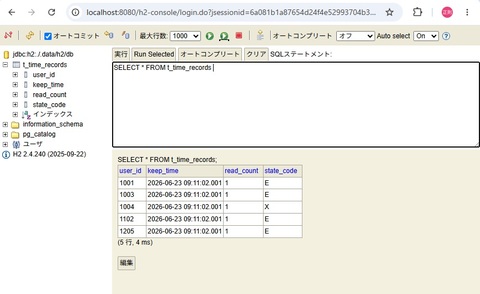
ちゃんと DB 登録までできとるよ。